
IPTV Service Provider Guide 2026 — How to Choose the Right One for USA
Choosing the right IPTV service provider is the single most important decision in your IPTV setup — more important than the app you use or the device you stream on. I'm Yassine, and after 3 years of testing IPTV providers for USA households, I can tell you that 80% of IPTV problems — buffering, black screens, dropped streams during live sports — trace back to a poor provider choice, not a device or app issue. This guide gives you the exact criteria, questions, and red flags to evaluate any IPTV service provider before spending a dollar.
The USA IPTV market in 2026 has hundreds of providers competing for subscribers. The quality difference between the best and worst providers is enormous — a top-tier provider delivers 99%+ uptime during NFL Sundays while a budget provider drops streams on the same channels during the same events. This guide cuts through the noise with a clear framework for evaluating any provider you encounter — whether it is one you found through a recommendation, a Reddit post, or a search result.
If you already have a provider and need help with setup, see our IPTV installation guide for Firestick or our IPTV Smart TV setup guide. For a ranked list of the top providers already tested for USA users, see our best IPTV services guide.
Why Your IPTV Service Provider Choice Determines Everything
Most new IPTV users focus on the app — TiviMate vs IPTV Smarters, Firestick vs Android box — when the provider is the variable that actually determines stream quality. Understanding why the IPTV service provider matters more than any other factor in your setup helps you make a faster, better decision.
Here is the simple truth: every IPTV app is just a player. It takes a stream URL from your provider and displays it on your screen. If the provider's server delivers a clean, stable stream, any app plays it perfectly. If the provider's server is overloaded or unreliable, no app can fix it — not TiviMate, not XCIPTV, not any app available in 2026.
The four ways a poor IPTV service provider ruins your experience regardless of your device or app:
- Buffering and freezing during live sports — the provider's server cannot handle simultaneous peak demand during NFL, NBA, and UFC events. Streams buffer or freeze for 5–30 seconds repeatedly. No device upgrade or app change fixes this — the problem is the provider's server capacity.
- Black screens on specific channels — the provider has listed channels they do not reliably have access to. The channel appears in your list but never loads or loads intermittently. This is a provider content rights issue — not a device problem.
- EPG always wrong or missing — a provider that does not invest in accurate EPG data delivery shows outdated schedules, wrong program names, or empty guide slots. This makes the service unusable as a cable replacement regardless of stream quality.
- No support when something breaks — budget providers disappear when their servers go down during peak events. A provider with no responsive support leaves you without a fix during the exact moments you need the service most.
Every issue above is a provider problem — not a device, app, or network problem. This is why choosing the right IPTV service provider from the start is the most important step in your setup. For setup instructions once you have chosen a provider, see our best IPTV apps for Firestick guide to pair the right app with your provider.
IPTV Service Provider Technical Requirements — What to Check Before Subscribing
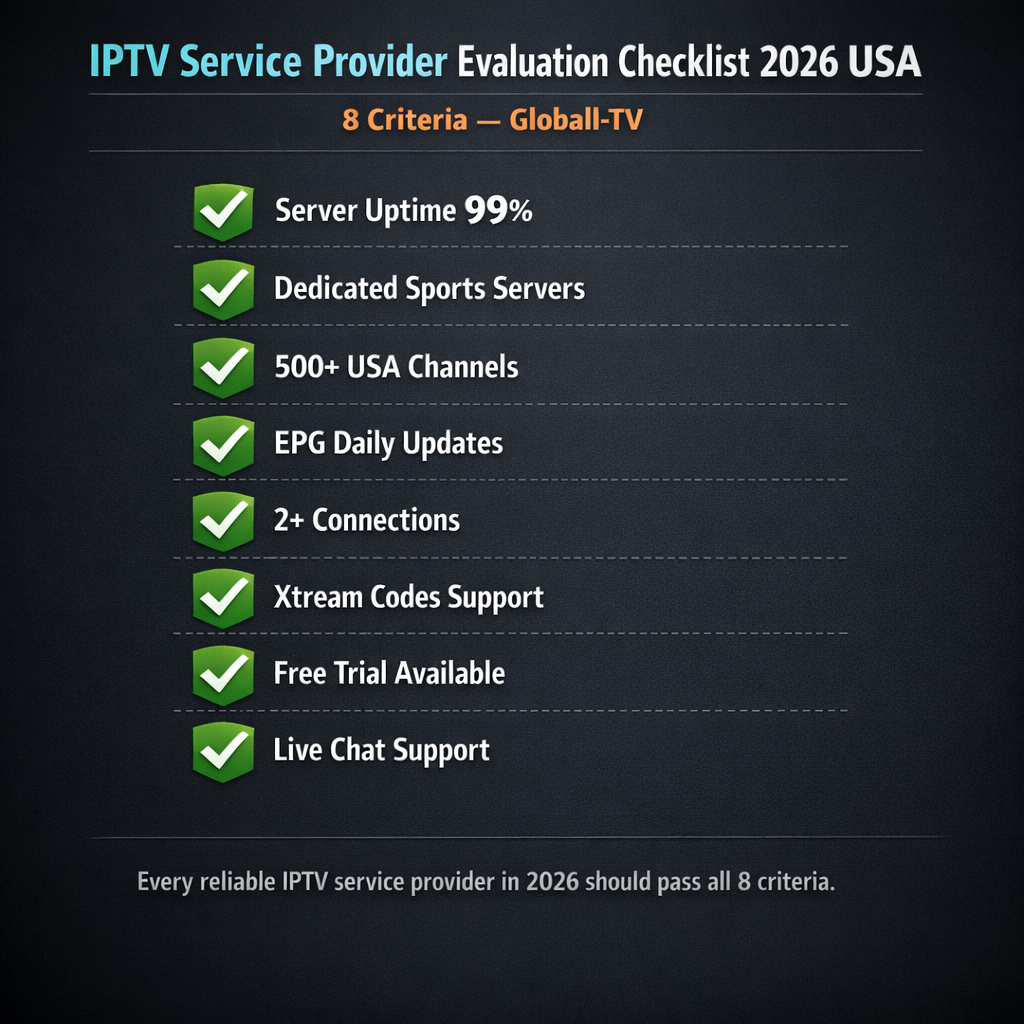
Every reputable IPTV service provider should be able to answer these technical questions clearly before you subscribe. If a provider cannot or will not answer them, treat that as a red flag.
| Technical Factor | What to Ask | Minimum Standard | Red Flag |
|---|---|---|---|
| Server uptime | What is your guaranteed uptime percentage? | 99%+ uptime | No uptime data provided |
| Sports server infrastructure | Do you have dedicated sports servers? | Dedicated sports CDN | Single shared server for all content |
| Channel count — USA | How many USA channels and sports networks? | 500+ USA channels minimum | Vague "thousands of channels" with no breakdown |
| EPG update frequency | How often is EPG data updated? | Every 24 hours minimum | No EPG or static EPG that never updates |
| Simultaneous connections | How many screens per subscription? | 2+ connections standard | 1 connection only with no upgrade option |
| Stream format | Do you support Xtream Codes and M3U? | Both formats supported | M3U only — limits app compatibility |
| Free trial | Do you offer a trial before payment? | 24–48 hour free trial | No trial — payment required upfront |
| Support channel | How do I reach support and what are response times? | Live chat or Telegram under 1 hour | Email only with 24–48 hour response time |
Any provider that scores well on all eight factors above is worth testing with a free trial. Any provider that refuses to answer these questions or gives vague responses to uptime, server infrastructure, or support availability is almost certainly a budget provider that will underperform during peak USA sports events. For a list of providers that have already been verified against these criteria, see our best IPTV services guide.
IPTV Service Provider Types — Full Comparison for USA Subscribers
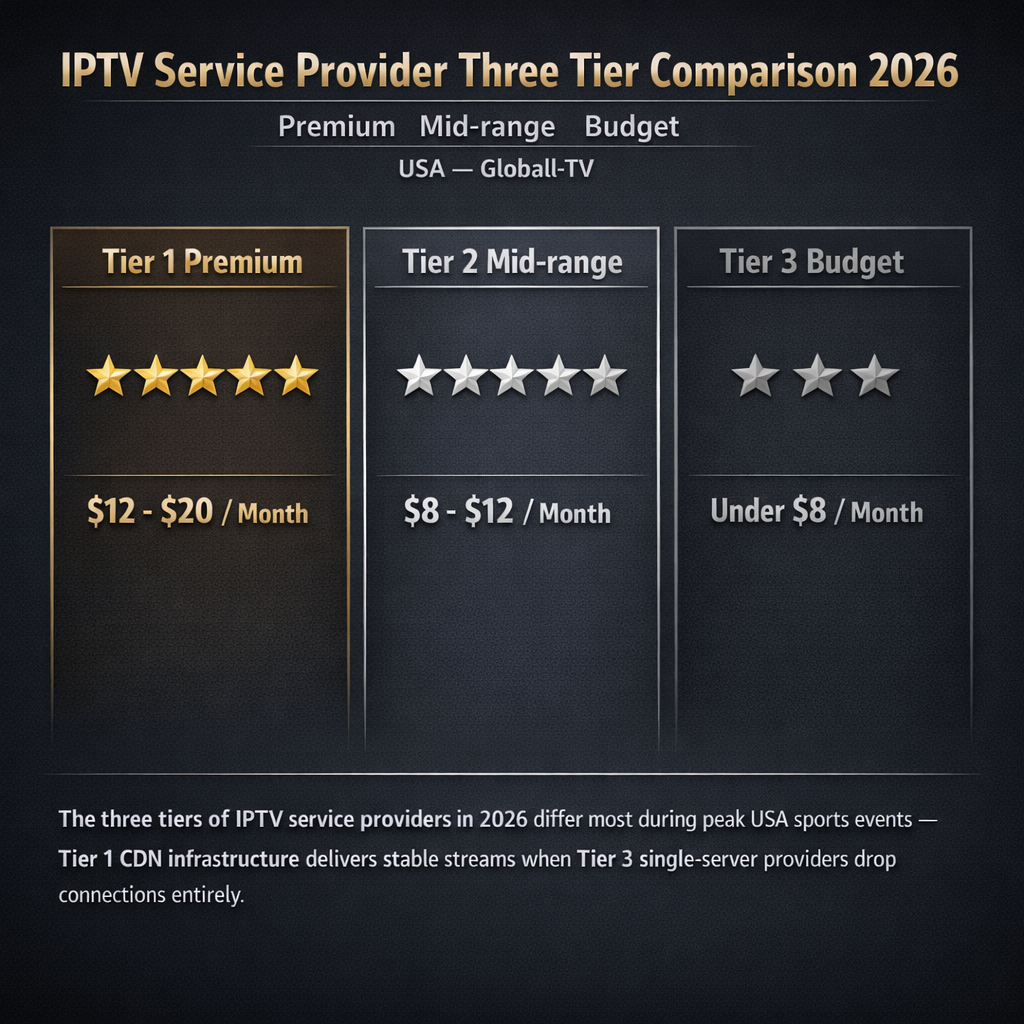
Not all IPTV service providers are built the same. Understanding the three tiers of providers available in the USA market in 2026 helps you identify which category any provider falls into before testing:
| Provider Tier | Price Range | Server Quality | Sports Performance | EPG Quality | Support | Free Trial |
|---|---|---|---|---|---|---|
| Tier 1 — Premium | $12–$20/month | CDN multi-node | ⭐⭐⭐⭐⭐ Excellent | ⭐⭐⭐⭐⭐ Daily updates | 24/7 live chat | ✅ Always |
| Tier 2 — Mid-range | $8–$12/month | Multiple servers | ⭐⭐⭐⭐ Good | ⭐⭐⭐⭐ Regular updates | Telegram/email | ✅ Usually |
| Tier 3 — Budget | Under $8/month | Single server | ⭐⭐ Poor during peak | ⭐⭐ Infrequent updates | Slow or none | ❌ Rarely |
The price difference between Tier 1 and Tier 3 is typically $5–$10 per month. For USA subscribers who primarily watch live sports — NFL, NBA, UFC, MLB — the difference in experience during peak events makes Tier 1 worth the premium. A Tier 3 provider that drops streams during the Super Bowl or NBA Finals delivers zero value at the moment it matters most.
Tier 2 providers are a viable option for subscribers who primarily watch non-sports content — movies, TV series, international channels — where peak simultaneous demand is lower and server capacity requirements are less demanding. For the best current Tier 1 providers tested for USA sports performance, see our best IPTV for Firestick 2026 guide.
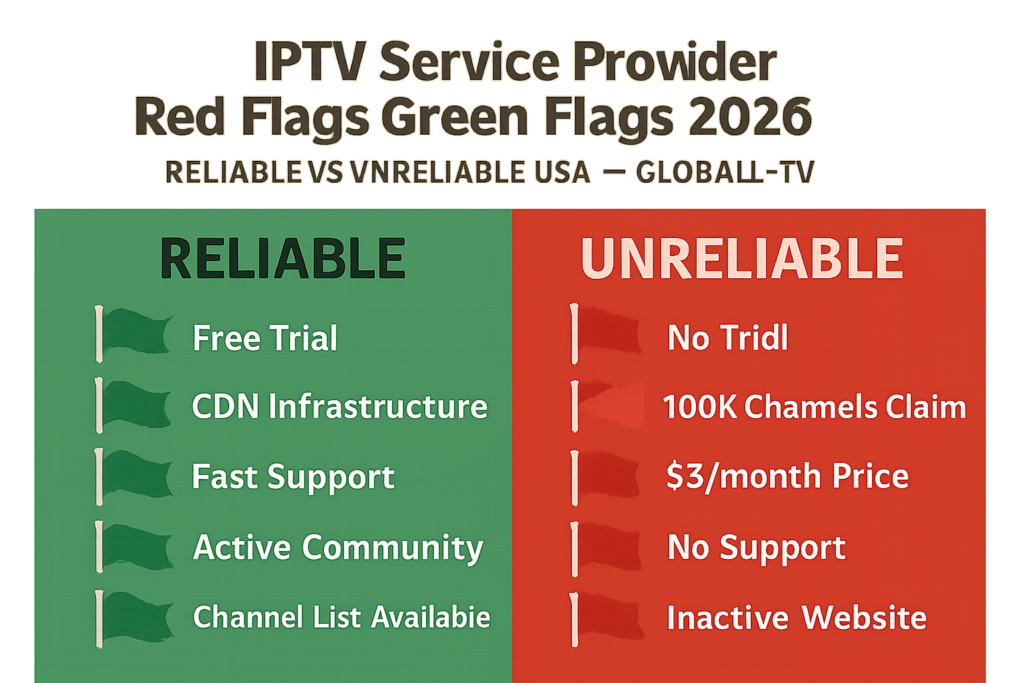
IPTV Service Provider Red Flags and Green Flags — What to Look For in 2026
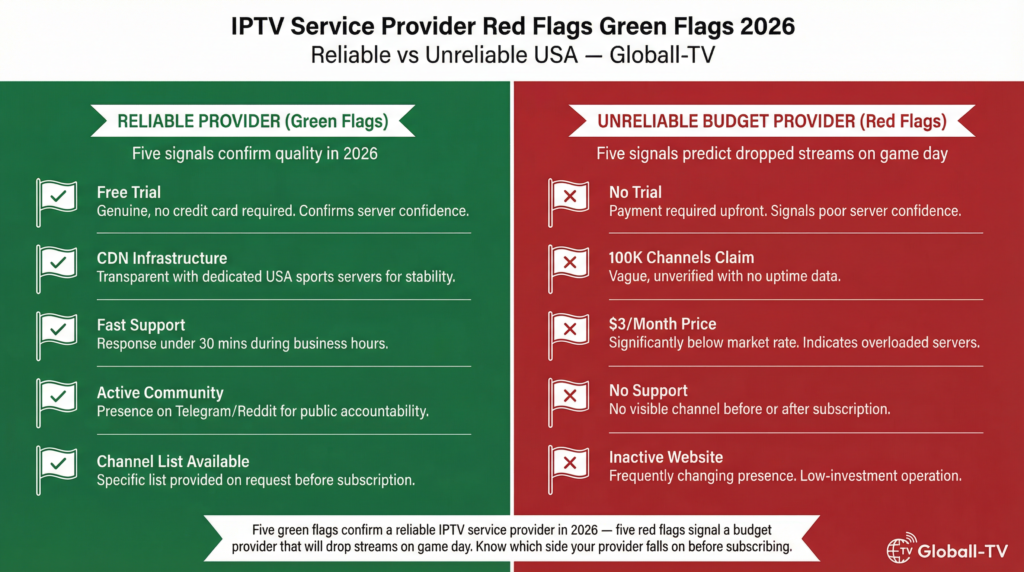
After testing hundreds of IPTV service providers for USA households over 3 years, these are the clearest signals that tell you whether a provider is worth your money before you commit to a subscription.
Green Flags — Signs of a Reliable IPTV Service Provider
- Offers a free trial with no credit card required — a provider confident in their server quality does not need to lock you in before you test. A genuine 24–48 hour free trial with full channel access and no payment details required is the strongest single signal of a reliable provider.
- Transparent about server infrastructure — top providers tell you they use CDN infrastructure with multiple USA server locations. They may not give you specific data center names, but they confirm dedicated sports servers exist and explain how failover works during peak events.
- Responsive support during the trial period — test support during your free trial, not after subscribing. Send a test message during peak evening hours (8–10 PM EST on a weekday) and time the response. Under 30 minutes is excellent. Under 2 hours is acceptable. Over 4 hours during a trial is a red flag for how they handle paid subscribers during a live event outage.
- Active social presence or community — legitimate providers have Telegram channels, Reddit presence, or active support communities where subscribers discuss performance. This public accountability means the provider cannot hide widespread outages.
- Specific channel lists available on request — a reliable provider can give you a channel list or at minimum confirm which specific USA sports networks they carry before you subscribe. Vague "we have everything" responses without specifics are a yellow flag.
Red Flags — Signs of an Unreliable IPTV Service Provider
- No free trial — payment required upfront — this is the single biggest red flag in the IPTV market. Every provider knows their server performance. A provider that will not let you test before paying knows their service will not pass a fair evaluation during peak hours.
- Extremely high channel counts with no specifics — "100,000 channels" is a marketing number that means nothing without uptime data. Providers that lead with channel count rather than uptime, server quality, or sports performance are almost always Tier 3 operators using single-server infrastructure.
- Prices significantly below market rate — a provider offering 50,000 channels for $3 per month cannot afford the server infrastructure required for reliable USA sports streaming. The economics do not work. Extremely low prices signal shared, overloaded servers that perform poorly during any peak demand window.
- No clear support channel — if you cannot find a clear way to contact the provider before subscribing, you will not be able to reach them when something breaks during a live game. Support accessibility is a direct indicator of how much a provider invests in their operation.
- Website and social presence disappeared or inactive — IPTV providers that suddenly go dark, change domains frequently, or have inactive social channels are often low-investment operations that may disappear entirely. For troubleshooting any provider issues after setup, our IPTV not working fix guide covers every diagnostic step.
How to Evaluate Any IPTV Service Provider — Step-by-Step Process (2026)
Use this exact process to evaluate any IPTV service provider you are considering in 2026 — whether it is one from our recommended list or one you found independently.
Step 1 — Verify a free trial is available
Before doing anything else, confirm the provider offers a free trial with no credit card required. If they do not, skip to the next provider on your list. There are enough quality providers offering genuine free trials in 2026 that paying upfront before testing is never necessary. A 24-hour trial with full channel access is the minimum acceptable standard. According to the FTC's guidance on free trial offers, legitimate services never require payment information to provide a genuine free trial — verify this before entering any card details.
Step 2 — Activate the trial and install the right app
Activate your free trial and install IPTV Smarters Pro or TiviMate on your device. Enter your Xtream Codes credentials exactly as provided — Server URL including port number, Username, and Password. Wait for the full channel list and EPG to load. On first connection this takes 2–8 minutes depending on channel count. If your credentials fail to connect, see our IPTV login error fix guide before assuming the provider is at fault — the most common cause is a trailing space in one of the credential fields.
Step 3 — Check your must-watch channels immediately
Do not browse randomly — go directly to the specific channels that matter most to your household. For USA sports subscribers: find ESPN, NFL Network, Fox Sports 1, your regional sports network, and any local affiliate channels you watch regularly. Load each one and confirm it plays in HD without buffering. Check the EPG data for each channel — confirm the program guide shows accurate current and upcoming schedules. A provider that fails on your specific must-watch channels during the trial period will fail on them after you subscribe.
Step 4 — Test during peak hours on a sports night
Schedule your trial to overlap with a live USA sports event — an NFL game, NBA game, or any major live broadcast. Load your sports channels between 7 PM and 11 PM EST during the event. Watch for a minimum of 20 minutes continuously. This is the only reliable performance test. A provider that streams perfectly at 2 PM on a Wednesday but drops during Sunday NFL prime time is not a reliable service for sports-focused USA households. If the trial period does not overlap with a live event, use the ESPN or Fox Sports live feed of any game as an alternative stress test.
Step 5 — Test support responsiveness
During your trial period, send a support message through the provider's official support channel — even if you have no actual issue. Ask a simple question about your account or channel list. Time the response. Under 30 minutes during business hours is the standard for Tier 1 providers. Over 4 hours on any support channel is a clear signal that post-subscription support will be inadequate during a live event outage. If the provider has no clearly visible support channel, do not subscribe regardless of stream quality during the trial — outages happen to every provider and support responsiveness determines how quickly they are resolved.
Step 6 — Make your subscription decision
If the provider passed Steps 1–5 — clean streams on your must-watch channels, stable performance during peak hours, accurate EPG, and responsive support — subscribe to a monthly plan first rather than an annual plan. One month of real-world performance across multiple sports events confirms long-term reliability before committing to a longer subscription. For the exact app configuration that maximizes performance with any provider, see our IPTV installation guide and our IPTV Smart TV setup guide.
Getting the Most From Your IPTV Service Provider — Optimization Tips for 2026
Once you have chosen a reliable IPTV service provider and completed your setup, these practices keep your service running at maximum performance.
Always Keep Your Credentials Backed Up
Save your Xtream Codes credentials — Server URL, Username, and Password — in at least two places: your phone's notes app and your email. Providers occasionally migrate servers and issue new credentials. If you have lost your original welcome email and cannot remember your credentials, you will need to contact provider support to reset them — which during a live event is the worst possible time to discover they are missing. Back them up now before you need them.
Renew Before Expiry — Not After
Most IPTV service providers suspend accounts immediately on the expiry date — not with a grace period. Set a calendar reminder 3 days before your subscription renewal date. Renewing after suspension sometimes requires a support ticket to reactivate the account, which adds unnecessary delay. Annual plans from Tier 1 providers typically offer 30–50% savings over monthly pricing — once you have confirmed a provider's reliability over 2–3 months, an annual plan is the better value. See our IPTV free trial USA guide for current trial and pricing details on top providers.
Report Channel Issues Immediately
When a specific channel stops working or buffers consistently while others stream fine, report it to your provider's support immediately with the exact channel name and the time the issue started. Top-tier providers fix individual channel issues within hours when reported specifically — they cannot fix what they do not know is broken. Vague reports ("some channels are not working") take longer to resolve than specific ones ("ESPN HD channel #245 has been buffering since 8 PM EST").
Use Wired Ethernet for Peak Sports Events
Even a Tier 1 provider with excellent server infrastructure cannot compensate for an unstable Wi-Fi connection on your end. For major live sports events — NFL playoffs, NBA Finals, UFC pay-per-view — connect your Firestick or Smart TV via wired Ethernet before the event starts. This eliminates the Wi-Fi signal drops that cause the majority of buffering complaints that are incorrectly attributed to the provider. For complete buffering diagnosis, see our IPTV not working fix guide.
Are IPTV Service Providers Legal in the USA?
IPTV technology and the apps used to access provider streams are completely legal in the United States. Subscribing to an IPTV service and streaming content through a provider on your Firestick, Smart TV, or any other device is legal activity for USA consumers.
The legal question in IPTV is always about content licensing — specifically whether the provider holds appropriate rights to distribute the channels they offer. Reputable IPTV service providers operating in the USA market in 2026 maintain the content licensing required for their channel offerings. For a complete breakdown of IPTV legality for USA subscribers including what to look for in a provider's terms of service, read our full guide: Is IPTV Legal in the USA?
Frequently Asked Questions — IPTV Service Provider Guide 2026
How do I find a reliable IPTV service provider in the USA?
The fastest way to find a reliable IPTV service provider for USA in 2026 is to start with providers that offer a genuine free trial with no credit card required and test them during a live sports event. A provider that delivers stable streams on ESPN, NFL Network, or Fox Sports during peak evening hours on a sports night has proven their server infrastructure handles real USA demand.
Avoid providers that require payment before testing, offer unrealistically low prices, or cannot specify their server infrastructure and uptime guarantees. Our best IPTV services guide lists the top-ranked providers already tested against these criteria for USA subscribers in 2026.
What is the difference between an IPTV service provider and an IPTV app?
An IPTV service provider is the company that operates the servers delivering your channel streams — they hold the content, maintain the server infrastructure, and provide your login credentials. An IPTV app is the software on your device that receives and displays those streams — TiviMate, IPTV Smarters Pro, XCIPTV, and Perfect Player are all apps, not providers.
You need both: a provider for the content and an app to display it. The provider determines stream quality and channel availability. The app determines EPG interface quality, player settings, and device compatibility. Our best IPTV apps guide covers which app pairs best with each type of provider and device combination.
How many simultaneous connections do I need from an IPTV service provider?
Most USA households need 2–3 simultaneous connections — one for the living room TV, one for a bedroom TV, and one for a phone or tablet. Single-connection subscriptions are only sufficient for solo viewers who never watch on more than one device at a time. If your household has multiple viewers who may watch different channels simultaneously, confirm your chosen provider supports at least 2 connections before subscribing.
Top-tier providers offer 3–5 simultaneous connections on standard subscription plans. Mid-range providers typically offer 2 connections. Budget providers often restrict to 1 connection and charge significant premiums for additional screens. Factor your household's multi-screen needs into your provider evaluation before committing to a plan.
What should I do if my IPTV service provider's streams keep buffering?
If streams buffer consistently across multiple channels, first rule out your network as the cause — connect via wired Ethernet and run a speed test to confirm you have at least 25 Mbps stable during the buffering. If your network is confirmed fast and stable, the issue is the provider's server capacity. Contact your provider's support with the specific channels affected and the times buffering occurs — peak-hour buffering on sports channels specifically is a server load issue the provider must address on their end.
If the provider cannot resolve consistent buffering within 48 hours of a support report, the service is not meeting Tier 1 standards and you should evaluate alternative providers during a free trial. For a complete step-by-step buffering diagnosis covering both network and provider causes, see our IPTV not working fix guide.
Can I use the same IPTV service provider on multiple devices?
Yes — all reputable IPTV service providers in 2026 support multiple device types on a single subscription. Your Xtream Codes credentials work on Firestick, Smart TV, Android phone, tablet, iOS devices, MAG boxes, and Android TV simultaneously — limited only by the number of simultaneous connections your plan allows. You do not need a separate subscription for each device type.
To set up your provider on a Firestick, see our IPTV installation guide. For Smart TV setup on Samsung, LG, and Android TV, see our IPTV Smart TV setup guide. For setup on any IPTV app including TiviMate and IPTV Smarters Pro, see our complete provider setup guide.
IPTV Service Provider Guide — Your Complete 2026 Decision Framework
Choosing the right IPTV service provider in 2026 comes down to one test: does it stream your must-watch USA sports channels reliably during peak hours? Every other factor — channel count, price, app compatibility — is secondary to that single performance benchmark. Use the 6-step evaluation process in this guide, always test with a free trial during a live sports event, and never subscribe to a provider that will not let you test before paying.
Here are all the resources you need to complete your IPTV setup with the right provider in 2026:
- 🏆 Best IPTV services 2026 — top providers already tested and ranked for USA users
- 📦 How to install IPTV on Firestick — complete setup guide for all Firestick models
- 📺 IPTV Smart TV setup — Samsung, LG, Android TV, and Fire TV Edition
- 📱 Best IPTV apps for Firestick 2026 — the right app for your device and provider
- 🆓 IPTV free trial USA — how to test any provider before subscribing
- 🔧 IPTV not working fix — buffering, black screen, and connection troubleshooting
- 🔐 Fix IPTV login errors — credential and authentication fixes for any provider
- ⚖️ Is IPTV legal in the USA? — complete legal guide for USA subscribers
Ready to test the top-ranked IPTV service provider for USA in 2026? Start your free Globall-TV trial today — 24 hours, no credit card required, full access to 25,000+ live USA channels. Test it during a live sports event and see exactly why it ranks first for USA subscribers. Your Firestick or Smart TV will be streaming within minutes of activation.
Have a question about a specific provider you are evaluating? Drop it in the comments with the provider name and I will give you my honest assessment based on 3 years of USA IPTV testing.
5 Responses