What Is IPTV on Smart TV and Why It Is the Best Way to Stream in 2026
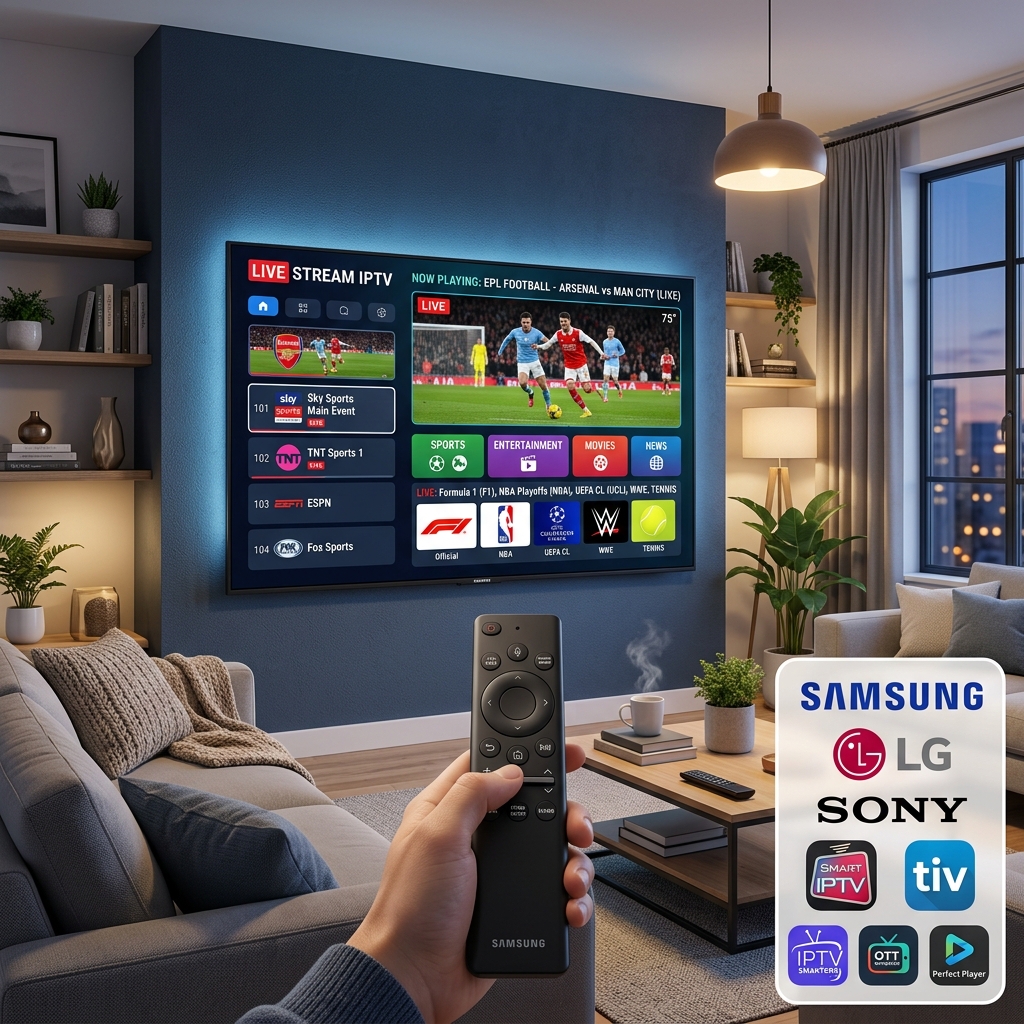
IPTV on Smart TV is the easiest way to watch live TV, sports, and on-demand content in the USA in 2026 — no cable box, no satellite dish, no extra streaming stick required. If you own a Samsung, LG, Sony, or Android TV, your television already has everything you need to stream 10,000+ live channels directly on your big screen using just your TV remote.
Unlike a Firestick setup, installing IPTV on Smart TV requires zero additional hardware. You open your TV's built-in app store, install one IPTV app, enter your subscription credentials, and within minutes you are watching live NFL, NBA, ESPN, HBO, and 4K channels on the best screen in your home.
If you are still paying $80–$150 per month for cable, you are overpaying. A Globall TV IPTV subscription gives you access to 10,000+ live channels — including all major US networks and sports — for as little as $10–$15 per month. Not sure yet? Visit our IPTV free trial USA page and test Globall TV on your Smart TV for free — no credit card required.
Why Your Smart TV Is the Best Screen for IPTV in 2026
Every major TV brand now supports IPTV Smart TV streaming natively. Here is why your television is the ideal device:
- No extra device needed: Your Smart TV already has a processor, Wi-Fi, and an app store — no Firestick, Android box, or HDMI stick required.
- 4K display built in: Stream 4K IPTV channels on the screen they were made for, at full resolution.
- Single remote control: No switching between a TV remote and a streaming stick — one remote controls everything.
- Best screen size: Most Smart TVs are 55–85 inches — far superior to watching on a phone, laptop, or tablet.
- Compatible from 2016: Any Smart TV manufactured from 2016 onward can run IPTV apps without modification.
- Multi-device value: Your IPTV subscription also works on your phone, tablet, Firestick, and laptop simultaneously.
Smart TV Brands Compared — Which Platform Works Best for IPTV in 2026?
Different Smart TV brands run different operating systems, and each OS has a different level of IPTV app support. This comparison table covers every major Smart TV platform so you know exactly which app to install before you start:
| TV Brand | Operating System | Best IPTV App in 2026 | IPTV Support Level | Compatible From |
|---|---|---|---|---|
| ⭐ Samsung | Tizen OS | Smart IPTV · IBO Player | Excellent | 2016+ |
| ⭐ LG | WebOS | IPTV Smarters Pro · Smart IPTV | Excellent | 2016+ |
| ⭐ Sony | Android TV / Google TV | TiviMate · IPTV Smarters Pro | Best overall | 2017+ |
| TCL | Android TV / Google TV | TiviMate · IPTV Smarters Pro | Excellent | 2018+ |
| Hisense | VIDAA OS / Android TV | Smart IPTV · IPTV Smarters | Good | 2018+ |
| Philips | Android TV / Saphi OS | IPTV Smarters Pro | Good | 2019+ |
| Vizio / Roku TV | SmartCast / Roku OS | ⚠️ Limited native support | Limited | Use Firestick via HDMI |
Sony, TCL, and all Android TV / Google TV models offer the best IPTV experience on Smart TV in 2026 because they provide full access to the Google Play Store — allowing you to install TiviMate Premium, the most powerful IPTV player, directly without any sideloading. For official specifications, visit the Samsung Smart TV page or the LG Smart TV page.
If your TV uses Roku OS or is an older pre-2016 model, the simplest fix is to plug an Amazon Firestick into your TV's HDMI port. It works on any TV, any brand, any age.
Ready to get started? View our IPTV subscription plans — monthly, quarterly, and annual options. All plans work on Samsung, LG, Sony, and Android TV out of the box.
How to Install IPTV on Smart TV in 2026 — Step-by-Step Guide for Every Brand
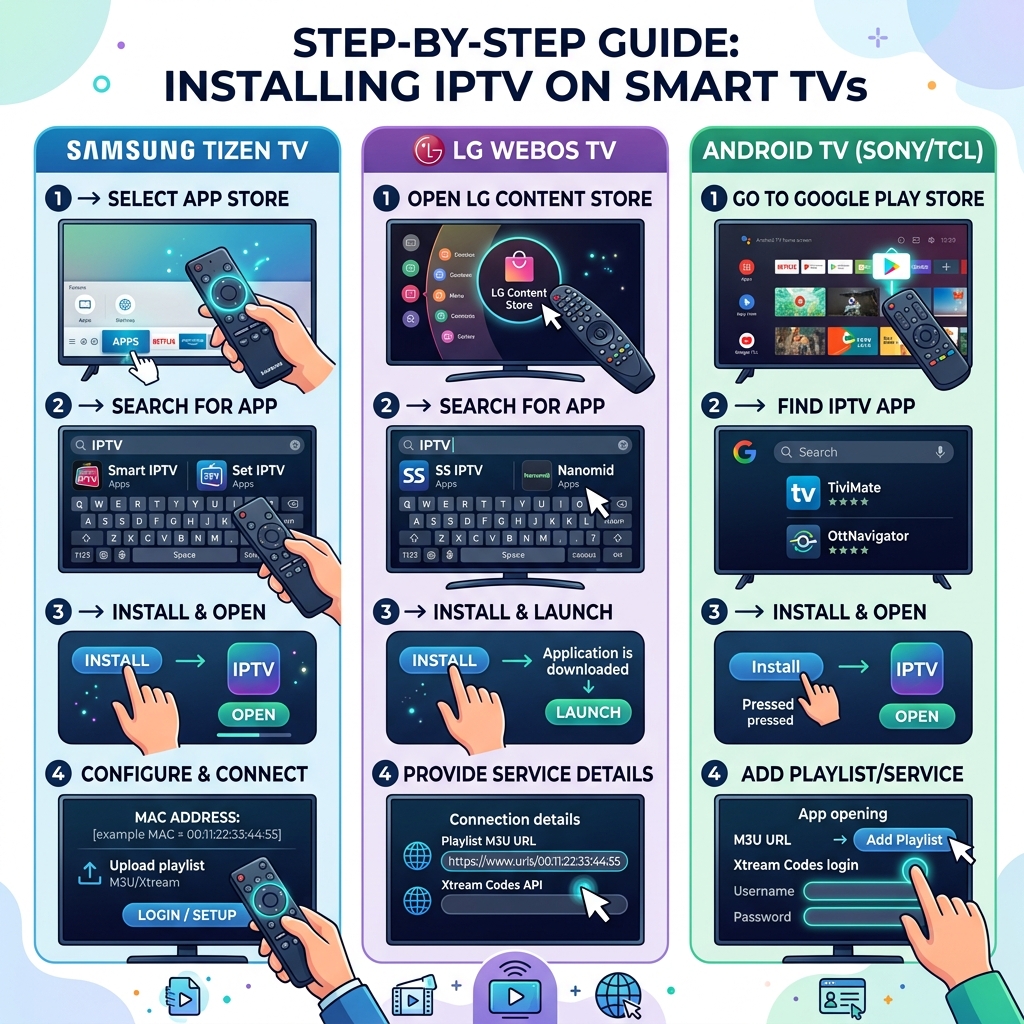
The steps to install IPTV on Smart TV are slightly different depending on your TV's operating system. Follow the guide for your brand below. Before starting, make sure you have your IPTV subscription credentials ready — either your Xtream Codes login (Server URL, Username, Password) or your M3U playlist URL from your provider.
No subscription yet? Start a free 24-hour IPTV trial with Globall TV — no credit card required. Or view all IPTV subscription plans.
How to Install IPTV on Samsung Smart TV (Tizen OS)
Samsung TVs run the Tizen OS. The recommended IPTV app for Samsung Smart TV is Smart IPTV (SIPTV) or IBO Player. Here is the exact installation process:
- Press the Home button on your Samsung remote.
- Navigate to Apps at the bottom of the home screen.
- Click the Search icon (magnifying glass) at the top right.
- Type "Smart IPTV" or "IBO Player" and select the app.
- Click Install and wait for the download to complete.
- Open the app — it will display a MAC address on screen.
- Go to siptv.eu/mylist on your phone or computer.
- Enter your Samsung TV's MAC address and paste your M3U playlist URL.
- Return to your TV and restart the Smart IPTV app — your channels will load automatically.
How to Install IPTV on LG Smart TV (WebOS)
LG TVs run WebOS. The best IPTV app for LG Smart TV in 2026 is IPTV Smarters Pro (if available in your region) or Smart IPTV. Here are the exact steps:
- Press the Home button on your LG Magic Remote.
- Open the LG Content Store.
- Click the Search icon and type "Smart IPTV" or "IPTV Smarters".
- Select the app and click Install.
- Once installed, open the app.
- If using Smart IPTV: note the MAC address, go to siptv.eu/mylist and register your M3U URL as explained in the Samsung steps above.
- If using IPTV Smarters Pro: select "Login with Xtream Codes API", enter your Server URL, Username, and Password from Globall TV, and tap Add User.
- Wait 30–60 seconds for your full IPTV channel list to load.
How to Install IPTV on Sony, TCL and Android TV / Google TV
Sony, TCL, Hisense (Android TV models), Philips, and Nvidia Shield all run Android TV or Google TV — the best platform for IPTV on Smart TV in 2026. These TVs give you direct access to the Google Play Store, meaning you can install TiviMate Premium — the most powerful IPTV player available.
- Press the Home button on your Android TV remote.
- Open the Google Play Store.
- Search for "TiviMate" (recommended) or "IPTV Smarters Pro".
- Click Install — both apps are free to download.
- Open the app once installed.
- Select "Add Playlist" → "Xtream Codes API".
- Enter your Server URL, Username, and Password from your Globall TV subscription.
- Tap Add and wait for your channels to load — typically 30–90 seconds.
Internet Speed Requirements for IPTV on Smart TV
Your Wi-Fi or ethernet connection is the most critical factor for buffer-free IPTV Smart TV streaming. Here are the exact speeds required:
| Stream Quality | Minimum Speed | Recommended Speed |
|---|---|---|
| SD (480p) | 5 Mbps | 10 Mbps |
| HD (720p / 1080p) | 15 Mbps | 25 Mbps |
| 4K Ultra HD | 25 Mbps | 50 Mbps+ |
| Multiple screens simultaneously | Add 15–25 Mbps per screen | 50 Mbps+ total |
Test your current speed for free at Speedtest by Ookla before setting up IPTV on your Smart TV. For best results, connect your Smart TV via ethernet cable rather than Wi-Fi — this eliminates buffering caused by wireless interference. Check our full 4K live IPTV channels list to see every channel available at each quality level.
Best IPTV Smart TV Apps in 2026 and How to Connect Your Subscription
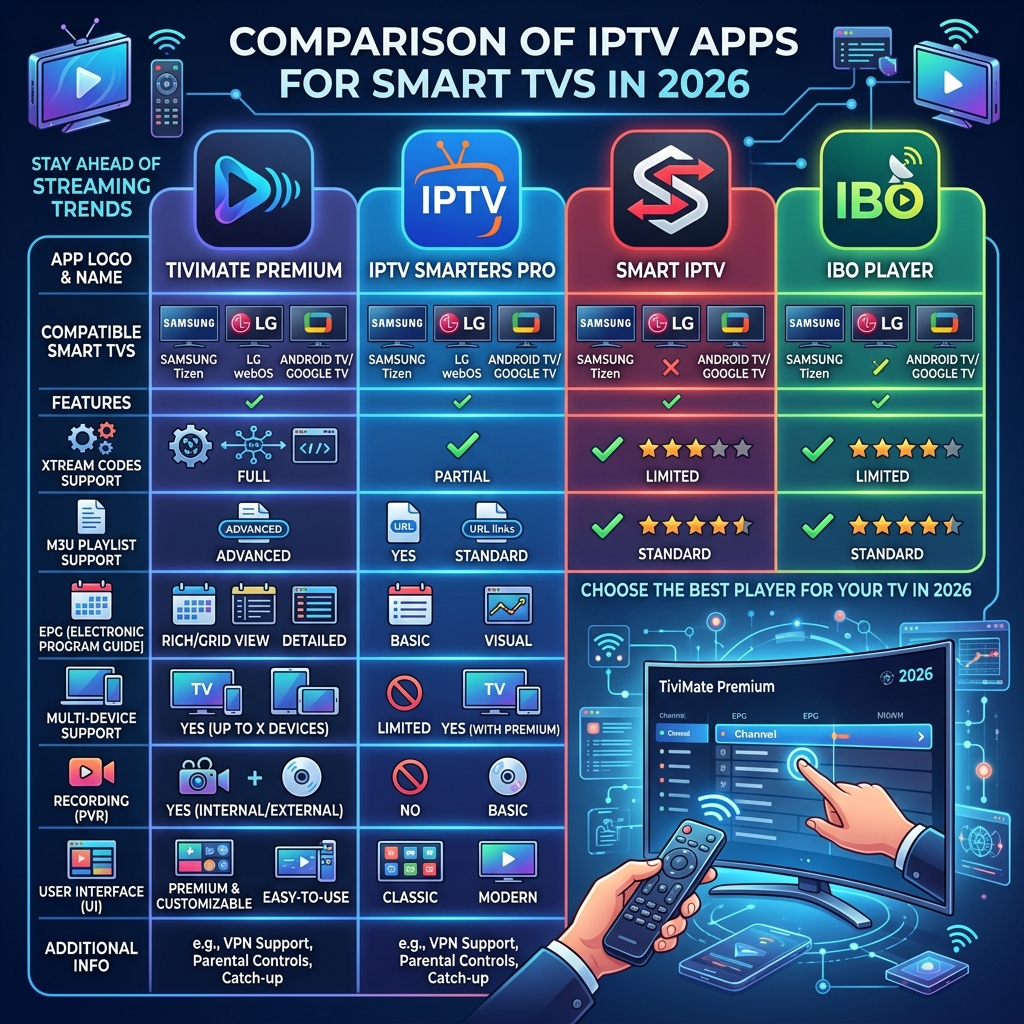
Choosing the right IPTV app for Smart TV depends on your TV's operating system. The best app for an Android TV is not always the best app for a Samsung Smart TV. Here is a complete comparison of every major IPTV Smart TV app available in 2026 — sorted by platform:
Best IPTV Apps for Smart TV — Full Comparison Table
| App | Compatible TVs | Price | Xtream Codes | EPG Support | Best For |
|---|---|---|---|---|---|
| ⭐ TiviMate Premium | Android TV · Google TV · Sony · TCL · Nvidia Shield | ~$4.99/year | ✅ Yes | ✅ 14 days | Best overall Smart TV IPTV app |
| ⭐ IPTV Smarters Pro | LG · Samsung · Android TV · Sony · TCL | Free | ✅ Yes | ✅ Yes | Beginners — works on all platforms |
| Smart IPTV (SIPTV) | Samsung · LG · Android TV | €5.49 one-time per TV | ❌ No (M3U only) | ✅ Basic | Samsung and LG users — simple setup |
| IBO Player | Samsung · LG | Free | ✅ Yes | ✅ Yes | Samsung users (Smart IPTV alternative) |
| SS IPTV | Samsung · LG | Free | ⚠️ Limited | ✅ Basic | Free option for Samsung and LG |
How to Connect Your IPTV Subscription to Your Smart TV App
Once your IPTV app is installed on your Smart TV, follow these steps to connect your Globall TV subscription and load all your live channels, sports, and on-demand content.
Method A — Xtream Codes login (recommended for all platforms):
- Open your IPTV app on your Smart TV (TiviMate, IPTV Smarters Pro, or IBO Player).
- Select "Add Playlist" → "Xtream Codes API" or "Login with Xtream Codes".
- Enter your Server URL, Username, and Password from your Globall TV subscription confirmation email.
- Tap Add or Save.
- Wait 30–120 seconds for your full IPTV channel list and EPG to load.
Method B — M3U Playlist URL (for Smart IPTV / SIPTV on Samsung and LG):
- Open your Smart TV browser or go to siptv.eu/mylist on your phone.
- Enter your TV's MAC address shown inside the Smart IPTV app.
- Paste your M3U playlist URL from your Globall TV subscription.
- Click Send.
- On your TV, restart the Smart IPTV app — channels load automatically.
Quick Setup Summary — IPTV Smart TV by Platform
| TV Brand | App to Install | Login Method | Setup Time |
|---|---|---|---|
| Samsung | IBO Player or Smart IPTV | Xtream Codes or M3U | ~5 minutes |
| LG | IPTV Smarters Pro or Smart IPTV | Xtream Codes (recommended) | ~5 minutes |
| Sony / TCL / Android TV | TiviMate Premium (recommended) | Xtream Codes | ~5 minutes |
That is it — your IPTV Smart TV setup is complete. For a complete guide covering every other device — Firestick, iPhone, Android, PC — visit our IPTV installation guide for all devices. If you encounter any issues, our support team is available 24/7 via our contact page.
Not yet subscribed? View our IPTV subscription plans or start with a free 24-hour IPTV trial — no credit card needed.
Frequently Asked Questions — IPTV Smart TV Setup 2026
Is IPTV legal on Smart TV in the USA?
IPTV technology is completely legal. The legality depends entirely on the provider you choose. A licensed provider like Globall TV operates within applicable US regulations. For a full breakdown, read our guide: Is IPTV Legal in the USA?
What is the best IPTV app for Samsung Smart TV in 2026?
The best IPTV app for Samsung Smart TV in 2026 is IBO Player (free, supports Xtream Codes) or Smart IPTV (€5.49 one-time fee, M3U based). If Smart IPTV is unavailable in your Samsung App Store region, IBO Player is the most reliable free alternative with full Xtream Codes support.
What is the best IPTV app for LG Smart TV in 2026?
The best IPTV app for LG Smart TV in 2026 is IPTV Smarters Pro, available for free in the LG Content Store in most US regions. It supports Xtream Codes login, EPG, multi-user profiles, and parental controls. If Smarters is unavailable in your region, use Smart IPTV or IBO Player as alternatives.
Does IPTV work on older Smart TVs?
Yes. IPTV works on any Smart TV manufactured from 2016 onward that supports app installation. Samsung and LG models from 2016+ running Tizen and WebOS are fully compatible. For Smart TVs older than 2016, the easiest solution is to connect an Amazon Firestick via your TV's HDMI port.
Can I watch 4K IPTV on my Smart TV?
Yes — if your Smart TV supports 4K and your internet speed is 25 Mbps or higher. A Globall TV subscription includes 4K Ultra HD channels for sports, movies, and premium content. Browse the full list on our 4K live IPTV channels page.
Can I get a free IPTV trial before subscribing?
Yes. Globall TV offers a free 24-hour IPTV trial — no credit card required. You can test all channels, stream quality, and Smart TV compatibility before choosing a plan. Start your free IPTV trial here.
Why is my IPTV buffering on Smart TV?
IPTV buffering on Smart TV is usually caused by Wi-Fi interference (switch to ethernet cable), slow internet speed (minimum 25 Mbps for HD), outdated app cache (clear in TV settings monthly), or overloaded provider servers. Use Xtream Codes login instead of M3U for better stability. If buffering persists, contact Globall TV 24/7 support.
How many devices can I use with one IPTV subscription?
A Globall TV IPTV subscription supports multiple simultaneous connections. You can watch on your Smart TV, Firestick, iPhone, Android phone, and tablet at the same time — all from a single subscription. View connection options on our IPTV subscription plans page.